
Azure Active Directory User Provisioning
Awareness
This section helps you to analyze the benefits of Azure Active Directory (Azure AD) User Provisioning. You will learn about the ease of use, pricing, and licensing model, as well as customer stories about how it helped improved their business. You will also receive up-to-date announcements and access to blogs that discuss ongoing improvements.
Business Overview
Many organizations rely upon software as a service (SaaS) applications for end-user productivity such as Office 365, Box, and Salesforce. Historically, IT staff have relied on manual provisioning methods or custom scripts to securely manage user identities in each SaaS application.
Azure AD User Provisioning simplifies this process by securely automating the creation, maintenance, and removal of user identities in cloud (SaaS) applications based on business rules. This allows an enterprise to effectively scale their identity management systems on both cloud-only and hybrid environments as they expand their dependency on cloud-based solutions.
This feature lets you:
- Automatically create new accounts in the right systems for new people when they join your team or organization.
- Automatically deactivate accounts in the right systems when people leave the team or organization.
- Ensure that the identities in your apps and systems are up-to-date based on changes in the directory, or your human resources system.
- Provision non-user objects, such as groups, to applications that support them.
Automated user provisioning also includes this functionality:
- The ability to match existing identities between source and target systems.
- Customizable attribute mappings that define what user data should flow from the source system to the target system.
- Optional email alerts for provisioning errors.
- Reporting and activity logs to help with monitoring and troubleshooting.
For more information, watch this video - What is user provisioning in Azure Active Directory?
Pricing and Licensing Requirements
The User Provisioning referred to here is: User Provisioning for SaaS applications. Azure User Provisioning capability requires you to use Azure Active Directory Premium P1, Premium P2. For more information about licensing and editions, refer to Sign up for Azure Active Directory Premium editions.
For more details, refer to Azure Active Directory pricing page.
You will also need the proper license for your application to meet your business needs. Discuss with the application owner whether the users assigned to and accessing the application have the proper licenses for their roles within the application. If Azure AD manages the automatic provisioning based on roles, the roles assigned in Azure AD must align with the correct number of licenses owned within the application. Improper number of licenses owned in the application may lead to errors during the provisioning/updating of a user.
Key Benefits
The key benefits of using Azure AD User Provisioning are:
Increase Productivity
Simplify the management of user identities across SaaS applications with a single user provisioning management interface. This includes having a single set of policies to decide who gets provisioned, who can sign into an application, and what user information is provisioned.
Manage Risk
Secure your organization by ensuring that user identities and access to key SaaS apps update automatically when users transition or leave the organization. This gets implemented based on a user's employee status or groups that define user roles and/or access.
Address Compliance and Governance
Supports native audit logs for every user provisioning request performed by each application for both source and target systems. This includes user imports, exports, and synchronization.
Manage Cost
Reduce costs by avoiding inefficiencies and human error associated with manual provisioning. This includes keeping custom-developed user provisioning solutions, scripts, and audit logs.
Customer stories/Case studies
To learn about customer and partner experiences on Azure AD User Provisioning, visit:- See the amazing things people are doing with Azure.
Announcements/Blogs
Azure AD receives improvements on an ongoing basis. To stay up to date with the most recent developments, see What's new in Azure Active Directory?.
Blogs by the Tech Community and Microsoft Identity Division:
- March 05, 2019, Automated user provisioning for Zscaler now in public preview
- September 07, 2018, User provisioning from Workday to Azure AD is now in Public Preview!
- August 07, 2018, Automatic user provisioning and deprovisioning now available for more apps!
Training/Learning Resources
The section provides concepts, role-based guidance, and lists the various training resources available on Azure AD User Provisioning.
Level 100 Knowledge/Concepts
Azure Active Directory (Azure AD) lets you automate the creation, maintenance, and removal of user identities in cloud (SaaS) applications such as Dropbox, Salesforce, ServiceNow, and more.
To learn more, see Automate user provisioning and deprovisioning to SaaS applications with Azure Active Directory. It covers the following topics:
- What is automated user provisioning for SaaS apps?
- Why use automated provisioning?
- How automated User Provisioning works?
- What applications and systems can I use with Azure AD automatic user provisioning?
- How to set up Automated User Provisioning?
- What happens during provisioning?
- How long will it take to provision users?
- How can I tell if users are being provisioned properly?
- How do I troubleshoot issues with user provisioning?
- What are the best practices for rolling out automatic user provisioning?
- More frequently asked questions
Additionally, refer to the following topics:
- Find out when a specific user will be able to access an application
- How to configure user provisioning to an Azure AD Gallery application
- What to do when user provisioning to an Azure AD Gallery application is taking hours or more
- What to do when there is a problem configuring user provisioning to an Azure AD Gallery application
- How to solve the problem saving administrator credentials while configuring user provisioning to an Azure Active Directory Gallery application
- What to do when no users are being provisioned to an Azure AD Gallery application
- What to do when the wrong set of users are being provisioned to an Azure AD Gallery application
Role-Based Guidance
IT Administrator Staff
The Global Administrator has access to all administrative features. By default, the person who signs up for an Azure subscription is assigned the Global Administrator role for the Azure AD. Global Administrators and Privileged Role Administrators can delegate administrator roles. See Administrator role permissions in Azure Active Directory.
Here are some additional links to help you get started:
- See Automate user provisioning and deprovisioning to SaaS applications with Azure Active Directory
- Follow the Managing user account provisioning for enterprise apps in the Azure portal
- Get a step-by-step Azure AD User Provisioning Deployment Plan
- Follow Best practices for rolling out automatic user provisioning?
- Troubleshoot Problem configuring user provisioning to an Azure AD Gallery application
- Follow Tutorials for Automatic User Provisioning
- Follow Tutorial: Reporting on automatic user account provisioning
- Refer to More frequently asked questions
Help Desk Staff
- Search Azure Active Directory User Provisioning FAQs
- Search the Microsoft Support Knowledge Basefor solutions to common technical issues.
- Search for and browse technical questions and answers from the community, or ask questions in the Azure Active Directory forums.
Training
On-Demand Webinars
Reserve here – Manage your Enterprise Applications with Azure AD
Learn how Azure AD can help you achieve single sign-on to your enterprise SaaS applications as well as best practices for controlling access for these applications.
Videos
- YouTube - What is User Provisioning in Active Azure Directory?
- YouTube - How to deploy User Provisioning in Active Azure Directory?
- Azure videos - Integrating Salesforce with Azure AD: How to automate User Provisioning
Marketplace
Automatic User Provisioning Marketplace
Online Courses
SkillUp Online - Managing Identities
"Learn how to integrate Azure AD with the many SaaS applications that are used, in order to secure user access to those applications."
Books
Microsoft Press - Modern Authentication with Azure Active Directory for Web Applications (Developer Reference) 1st Edition. "This book will guide you through the essentials of authentication protocols, decipher the disparate terminology applied to the subject, tell you how to get started with Azure AD, and then present concrete examples of applications that use Azure AD for their authentication and authorization, including how they work in hybrid scenarios with Active Directory Federation Services (ADFS)."
Tutorials
Refer to the list of application Tutorials for Automatic User Provisioning.
FAQ
Refer to More frequently asked questions.
End-user Readiness and Communication
This section provides customizable posters and email templates to roll out Azure AD User Provisioning to your organization.
Refer to Azure AD User Provisioning Deployment Plan.
Planning and Change Management
This section provides the resource links to Azure AD User Provisioning deployment plan and topology to help you determine your User Provisioning strategies and document your decisions and configurations to prepare for implementation.
Deployment Plan
Azure AD features pre-integrated user provisioning support for a variety of popular SaaS applications as well as generic user provisioning support for applications that implement specific parts of the System for Cross-Domain Identity Management (SCIM) 2.0 protocol specification.
Applications that support provisioning in the Azure AD Application Gallery come pre-configured with default user provisioning settings. However, you have the choice to customize the configuration of the user provisioning connector to suit your organization's needs.
Once configured, Azure AD can send requests to create, modify, deactivate, or delete assigned users and/or groups to the desired applications via their web services. The web services can then translate those requests into operations on the target identity store.
For more information, refer to "Planning Your Implementation" and "Designing Your Implementation" section in the Azure AD User Provisioning Deployment Plan.
Architecture Plan/Topology
Refer to the "Solution Architecture Diagram and Description" under "Planning Your Implementation" section in the Azure AD User Provisioning Deployment Plan.
Azure AD Outbound Automatic User Provisioning – Cloud-only Enterprises
The following diagram illustrates the end-to-end user provisioning workflow that occurs for common cloud-only environments. In this example, user creation occurs in Azure AD and the automatic user provisioning is managed by the Azure AD provisioning service to the target (SaaS) applications:

Azure AD Outbound Automatic User Provisioning – Hybrid Enterprises
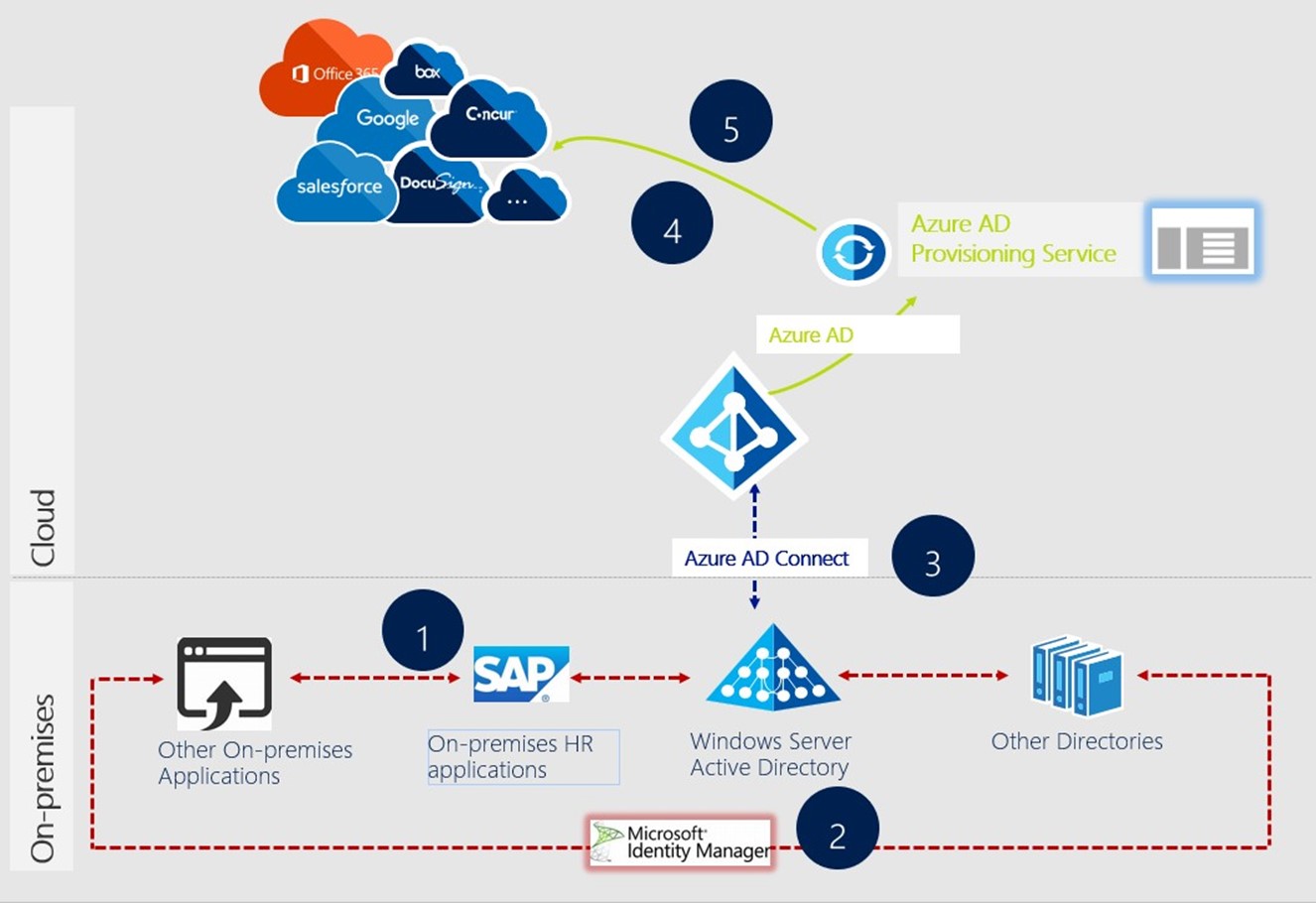
The following diagram illustrates the end-to-end user provisioning workflow that occurs for common hybrid environments. In this example, user creation occurs in an HR database connected to an on-premises directory while outbound automatic user provisioning is managed by the Azure AD provisioning service to the target SaaS applications:
Testing
This section provides the plan to test the functionality of Azure AD User Provisioning in a sandbox or test lab environment before the customer rolls it into production.
We recommend that the initial configuration of automatic user provisioning should be done in a test environment with a small subset of users before scaling it to all users in production.
Refer to "Implementing Your Solution" section in the Azure AD User Provisioning Deployment Plan and follow the steps in a test lab before you transition it into production.
Additionally, refer to the guidance in the following topics:
- Automate user provisioning and deprovisioning to SaaS applications with Azure Active Directory
- Managing user account provisioning for enterprise apps in the Azure portal
- Using System for Cross-Domain Identity Management (SCIM) to automatically provision users and groups from Azure Active Directory to applications
- Customizing User Provisioning Attribute-Mappings for SaaS Applications in Azure Active Directory
- Writing Expressions for Attribute Mappings in Azure Active Directory
- Attribute-based application provisioning with scoping filters
- Application Tutorials for Automatic User Provisioning
- More frequently asked questions
Deployment
How can I get Azure AD User Provisioning deployed in my environment? This section provides resource links to help with implementation of your solution.
Deployment
Refer to "Implementing Your Solution" section in the Azure AD User Provisioning Deployment Plan.
Additionally, refer to the guidance in the following topics:
- Automate user provisioning and deprovisioning to SaaS applications with Azure Active Directory
- Managing user account provisioning for enterprise apps in the Azure portal
- Using System for Cross-Domain Identity Management (SCIM) to automatically provision users and groups from Azure Active Directory to applications
- Customizing User Provisioning Attribute-Mappings for SaaS Applications in Azure Active Directory
- Writing Expressions for Attribute Mappings in Azure Active Directory
- Attribute-based application provisioning with scoping filters
- Application Tutorials for Automatic User Provisioning
- More frequently asked questions
Readiness Checklist
Refer to the Azure AD User Provisioning Deployment Plan.
Design Template
Refer to the Azure AD User Provisioning Deployment Plan.
Operations
How do I manage and maintain Azure AD User Provisioning? This section provides troubleshooting info, Azure AD User Provisioning operation and management details, and other important references.
Monitoring
Refer to the following topics:
- Managing user account provisioning for enterprise apps in the Azure portal
- Tutorial: Reporting on automatic user account provisioning
Troubleshooting
The provisioning summary report and audit logs play a key role in helping admins troubleshoot various user account provisioning issues.
For scenario-based guidance on how to troubleshoot automatic user provisioning, see Problem configuring user provisioning to an Azure AD Gallery application.
Additionally, refer to the following topics:
- Find out when a specific user will be able to access an application
- How to configure user provisioning to an Azure AD Gallery application
- What to do when How to configure user provisioning to an Azure AD Gallery application is taking hours or more
- What to do when there is a Problem configuring user provisioning to an Azure AD Gallery application
- How to solve the Problem saving administrator credentials while configuring user provisioning to an Azure Active Directory Gallery application
- What to do when No users are being provisioned to an Azure AD Gallery application
- What to do when Wrong set of users are being provisioned to an Azure AD Gallery application